MetaShare depends on the service health of Microsoft 365 and Azure. You can also get updates on Microsoft’s health status from Twitter (@MSFT365Status).
If there are no ongoing problems with Microsoft 365 and your problem is not listed here, check our known issues.
Ongoing issues
-
Search properties missing
Start time: 11 August 2026
Some tenants are experiencing issues with search properties – managed and crawled properties are not displayed in Search Schema in Search Administration. We have seen:
- Previously working properties not displayed, but continuing to work.
- Previously working properties not displayed and not working anymore, leading to empty search results.
- Properties for newly created columns not appearing, possibly not being created.
We’ve reported these issues to Microsoft and continue to monitor them while we wait for their response.
Workaround: 13 October 2026
We got a suggestion from Microsoft Support to search for crawled properties skipping one or a few first letters of the name, e.g. “omeColumn” instead of “SomeColumn” and it seems that we are able to find all crawled properties using this method, at least in some tenants. Sometimes one letter is enough, but sometimes more are needed. This workaround can be used until Microsoft resolves the issue.
-
Recent documents include only one document
Start time: 12 November 2025
Updated: 17 December 2025Microsoft has recently deprecated Graph endpoint used for retrieving recent documents which is used by MetaShare. Usually, deprecated endpoints continue to work for some time, giving developers time to update APIs they use. Unfortunately in this case, according to Microsoft, the recent endpoint will continue to work in a degraded state, which appears to mean retrieving only one item. We are working on an update using different APIs to resolve the issue.
Resolved issues
-
Issues with loading documents in some tenants
Start time: 12 October 2026
We have identified an issue that prevents documents from loading in a small number of tenants. It appears to be caused either by an undocumented breaking change in Microsoft’s APIs or by a corrupted configuration in the affected tenants. We have developed and deployed a fix in MetaShare that resolves the issue. No further MetaShare Online customers should be affected, even if the change on Microsoft’s side was intentional. Customers running self-hosted MetaShare who encounter this issue need to install the hotfix in their environment. Please contact [email protected] if you need help.
Update: 13 October 2026 1:05 pm (CEST)
We have identified and fixed related issue that affected two other tenants.
Update: 13 October 2026 3:24 pm (CEST)
Microsoft has now published an alert SP1503038 that seems to match the issue. It mentions possible “Null target exceptions” that we were seeing in MetaShare and identifies recent API change as possible root cause. MetaShare was updated to use slightly different API calls that remain unaffected by this issue.
Update: 14 October 2026
It appears that Microsoft have restricted the alert message to the affected tenants. You may see a “You don’t have permission to access this post” error.
Resolved: 15 October 2026
Microsoft has informed that the issue is now resolved.
-
Search refiners not working in some tenants
Start time: 6 August 2026
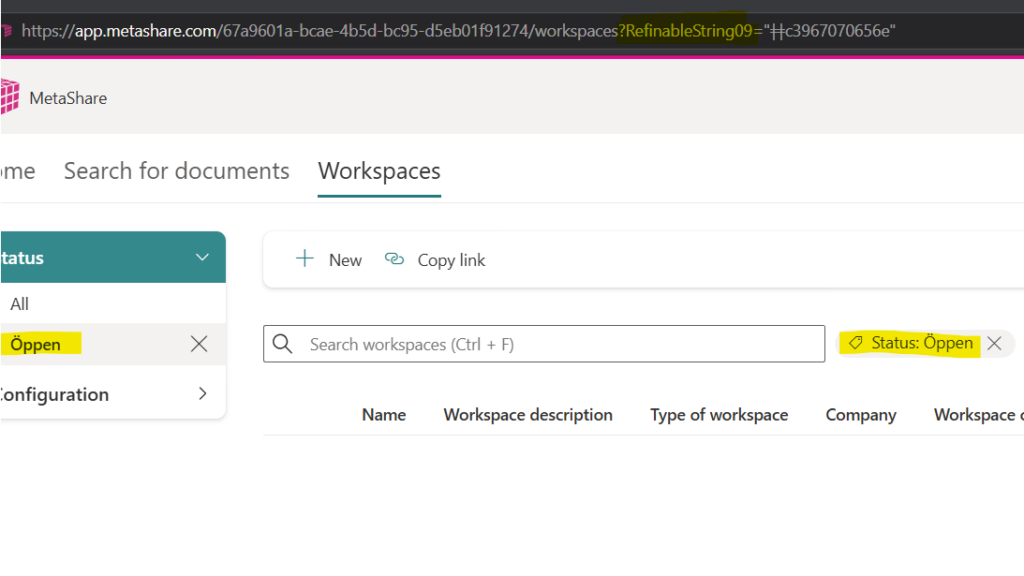
We have found that in some SharePoint tenants selecting refiners containing special characters breaks the search and no results are returned. Since MetaShare’s filters on the “Search for documents” and “Workspaces” pages are based on search refiners, the same issue happens there.
We’ve contacted Microsoft regarding this issue.
As a workaround it is possible to search using the filter, instead of selecting it. For example searching for “RefinableString09:Öppen”, or “status:öppen” (if you have added custom search aliases), will find all documents with that search property value. To find the name of the search property to use you can select the filter and check the name of the property that was used in the URL:
Update: 7 August 2026
Microsoft has marked our Service Health issue reported in the Admin Portal as “No issue found” in two tenants where it was reported. We continue to work to get the issue acknowledged and resolved.
Update: 11 August 2026
We have opened a support request with Microsoft regarding the issue. If you’re affected and want to open a support request for your tenant, you can reference the tracking ID 2608111420000747.
Update: 21 August 2026
Thanks to a community member sharing their findings about the issue we were able to apply a workaround which will allow affected tenants to use refinements with special characters in MetaShare. The issue is caused by Microsoft APIs returning refiner tokens encoded with UTF8, but then expecting them to be encoded with Latin1 to work correctly. We could see that Microsoft is now aware of the bug reports and is trying to investigate the issue, but has not confirmed it as a bug yet.
SharePoint search centers using custom filters and PnP Search web part are unfortunately still affected. We continuously try to make Microsoft acknowledge the issue through Microsoft Support cases and through other channels.