Start time: 6 August 2026
We have found that in some SharePoint tenants selecting refiners containing special characters breaks the search and no results are returned. Since MetaShare’s filters on the “Search for documents” and “Workspaces” pages are based on search refiners, the same issue happens there.
We’ve contacted Microsoft regarding this issue.
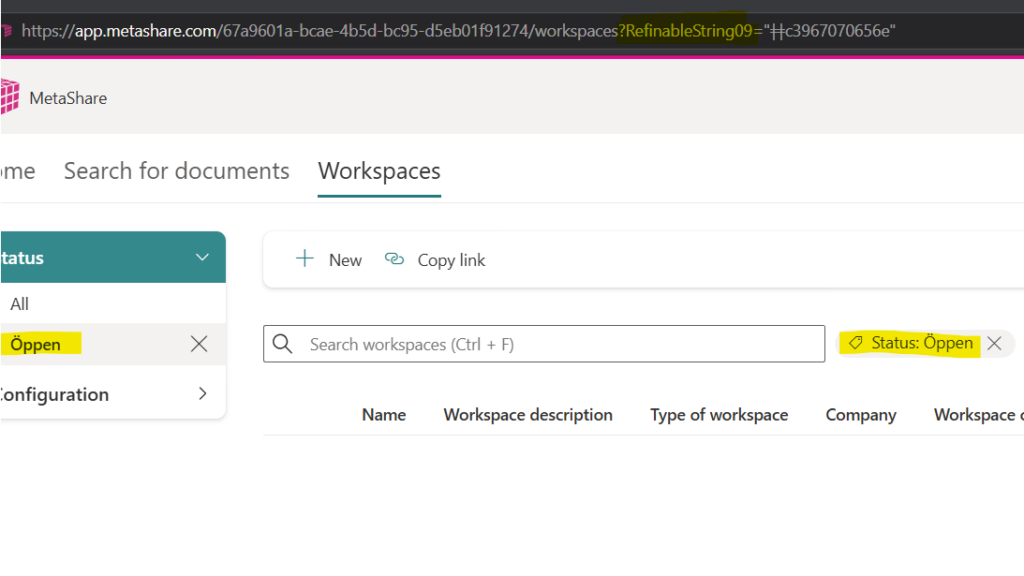
As a workaround it is possible to search using the filter, instead of selecting it. For example searching for “RefinableString09:Öppen”, or “status:öppen” (if you have added custom search aliases), will find all documents with that search property value. To find the name of the search property to use you can select the filter and check the name of the property that was used in the URL:
Update: 7 August 2026
Microsoft has marked our Service Health issue reported in the Admin Portal as “No issue found” in two tenants where it was reported. We continue to work to get the issue acknowledged and resolved.
Update: 11 August 2026
We have opened a support request with Microsoft regarding the issue. If you’re affected and want to open a support request for your tenant, you can reference the tracking ID 2608111420000747.
Update: 21 August 2026
Thanks to a community member sharing their findings about the issue we were able to apply a workaround which will allow affected tenants to use refinements with special characters in MetaShare. The issue is caused by Microsoft APIs returning refiner tokens encoded with UTF8, but then expecting them to be encoded with Latin1 to work correctly. We could see that Microsoft is now aware of the bug reports and is trying to investigate the issue, but has not confirmed it as a bug yet.
SharePoint search centers using custom filters and PnP Search web part are unfortunately still affected. We continuously try to make Microsoft acknowledge the issue through Microsoft Support cases and through other channels.